How to Use the Wheel of Names
- Enter names individually or paste a list. Type a name and press Enter, or paste a column from a spreadsheet or class register; every line becomes its own slice.
- Review and edit the entries. Fix a typo with the pencil, remove someone with the cross, or click “Edit as text” to check the whole list at once.
- Spin. Press Spin, tap the center of the wheel, or tab to it and press Enter.
- View the selected winner. The name appears under the wheel and in a pop-up, and it is added to the History tab with a number and time.
- Spin again, or remove the winner first. Choose “Remove from wheel” in the pop-up, or switch on “Remove winner after each spin” in Settings to keep going without repeats.
Ten sample names are loaded so you can try a spin straight away. Your list is saved in this browser, so it is still there next time you open the page.
Whether you call it a name spinner, a name spinner wheel or a name spin wheel, the steps above are all it takes. With a long list the slices get thin, but the winning name always appears in full under the wheel, so you can pick a name from a whole class or team in one spin.
What Is a Wheel of Names?
A wheel of names is an interactive random name picker wheel. You add a list of people, each name gets an equal slice of a colorful wheel, and a spin selects one of them. It does the same job as drawing a name from a hat, but the choice happens on screen where everyone can see it.
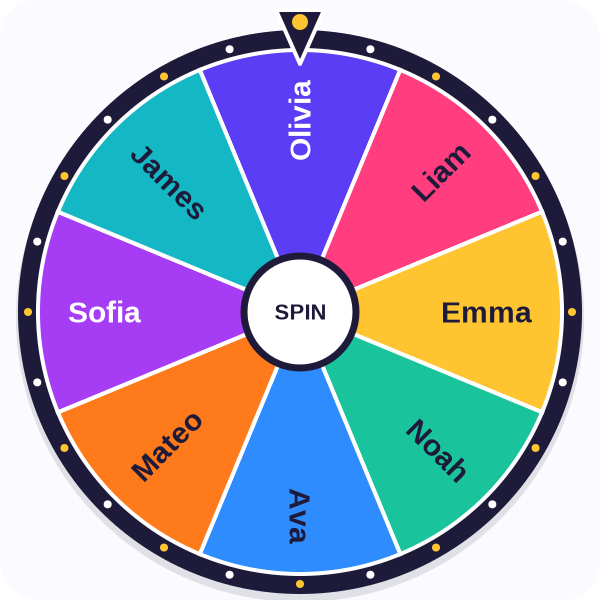
That visibility is the difference from simply picking a name off a list. When a teacher or manager chooses, people wonder why that person was chosen. When the whole room watches you spin the wheel of names and the pointer slows to a stop, the result feels like nobody’s decision, which is exactly what you want when choosing who answers next or who goes first. Whenever you need to spin the wheel with names, this is the page to use; for any other kind of list, spin the wheel online with your own options.
People look for this under many names: a random name generator, a name randomizer, a random name chooser or a random name selector wheel. They all mean the same job here: choosing one name fairly from a list you already have. The wheel does not make up names; it works as a name wheel generator that turns your list into slices, then as a random name wheel and name wheel picker that everyone can watch.
Where Can You Use a Random Name Picker?
Classroom participation
Paste the class list, project the wheel and spin before each question. Students stay ready because anyone could be next, and nobody can say the teacher is picking favorites. The guide to using a wheel of names in classrooms and giveaways has routines that work well in lessons.
As a classroom spinner, it also handles seating plans, reading order and who hands out the books. Keep one saved list per class and the wheel is ready at the start of every lesson.
Team meetings and presentation order
Spin to set the speaking order for a stand-up, choose who presents first, or decide who takes the notes this week. Share your browser tab in a video call so remote colleagues see the same spin.
Casual giveaways and prize draws
For a small giveaway on a stream or at an event, paste the entrants’ names and spin live. It is a fun, visible way to draw a winner. It is not an audited lottery or a certified raffle system, so for regulated promotions follow the rules that apply where you are.
Used as a giveaway picker, the wheel takes your list of entrants and lands on one at random while the audience watches. You don’t need a separate giveaway generator or giveaway winner picker: switch on remove-winner mode to pick a winner for each prize in turn, so the same person cannot win twice. Unlike a random winner generator that only shows a result, everyone sees how the winner was chosen.
Family games, parties and group decisions
Decide who goes first in a board game, who picks the movie, or who chooses the takeaway. Use it to pick volunteers, assign turns, or settle any choice where every option is acceptable.
To draw names for a gift exchange or a chore rota, use the wheel as a simple name draw generator: turn on remove-winner mode and spin once per person. Each draw takes that name off the wheel, so nobody is picked twice and the last name left is decided too.
More Free Wheel Tools
This page is built for picking names. For other choices, each of these tools starts with a ready-made list you can edit.
Custom spin wheel
Need a wheel for prizes, chores or questions? The custom spin wheel maker lets you give your wheel a title, replace the demo options with your own and spin. To use any list without a title, spin the wheel online.
Color wheel spinner
The color wheel spinner paints every slice in its real color. Choose rainbow, pastel or neon palettes, copy the HEX code of the result, or play the color guessing and drawing games.
Number picker wheel
Pick a random number with the number picker wheel. One click sets 1–10, 1–20, 1–50 or 1–100, or you can enter any range and draw numbers without repeats.
Decision and yes-or-no wheels
For a two-way question, the yes or no wheel gives a 50/50 answer. To choose between several options such as meals or weekend plans, let Wheel Decide pick, or paste any list into the random choice generator. The letter picker wheel and truth or dare wheel are ready for games.
Pick Multiple Names Without Repeats
To choose several different people, turn on Remove winner after each spin in Settings. Each time you close the result, the selected name leaves the active wheel, so the next spin is a fair draw among the people who are left. Spin three times and you have three different winners, in the order they were drawn, and the History tab keeps the full record.
This only works as expected when every person appears once. If a name is on the list twice, it has two slices and can still be drawn again after one copy is removed. Duplicates are useful on purpose, for example to give someone a bonus entry, but if two people share a name, add an initial or surname so they are separate entries, such as “Sam K.” and “Sam T.”.
When everyone has been picked, press Reset this wheel in Settings to bring back the starting list, or paste your list again.
Is Our Wheel of Names Random?
Yes, within the limits of any browser-based tool, and here is exactly how it works. When you press Spin, the winner is chosen first, using the browser’s cryptographic random number generator (crypto.getRandomValues) with a method that gives every slice exactly the same chance. Only then is the animation calculated, so the wheel stops on the name that was already chosen.
That means the animation never decides anything. Spin length, speed, the countdown and the stopping style, including the dramatic “near miss”, only change what you see. Shuffling changes where names sit on the wheel, not their chances. With 25 names, each name has a 1 in 25 chance on every spin.
The wheel has not been independently audited or certified, and like any web page it runs on the device that opens it. For casual selections it is fair and transparent; for anything with legal or financial stakes, use a certified drawing service. Read more in is a wheel of names truly random?
For a longer explanation of how the winner is chosen, read is the wheel of names truly random?
Share Your Wheel or Use It Full Screen
Use the share button above the list to copy a link that contains your names. Anyone who opens it gets the same wheel, which is handy for sending a class list to a colleague. The names travel inside the link itself, so only share it with people who should see them.
Press the full-screen button on the wheel to fill a projector or shared screen. You can still spin by clicking the center or pressing Enter or Space.
Customize Colors and the Spin
- Color themes: Vibrant, Pastel, Ocean, Sunset, Forest or Monochrome.
- Spin animation: spin length from 2 to 30 seconds, speed, a 3-2-1 countdown, how the wheel stops and a pause before the reveal. The Suspense and Game show styles set it all in one tap.
- Sort and shuffle: sort names alphabetically, or shuffle their order on the wheel.
- Sound and confetti: sound is off until you switch it on; confetti can be turned off too.
Your Names Stay in Your Browser
There is no account and nothing to install. Your names, settings and history are stored in your browser’s local storage on this device and are not sent to our server. They do not sync to other devices, and clearing your browser data removes them. The privacy policy has the details.